How I tested this. Microgreen Manager gave me free access to a Pro account for this review. I set up crops, built delivery schedules, ran the task dashboard, and generated tray labels and batch records myself. Before publishing, I asked the team to fact-check my description of the feature set. The team saw the full draft before publication. They corrected factual errors about the feature set. They did not change the rating, the criticisms, or the recommendation.
Wednesday morning. A text from Chef Marco at Rosario’s lands on your phone: “Just confirming Friday delivery. Same order as last week?”
You pull up the spreadsheet. Tab one, then two. The recurring orders tab sits untouched since Monday. One variety is missing from the sow schedule. It was supposed to go in four days ago.
The trays are empty. The harvest won’t make Friday.
I’ve talked with enough commercial growers to know that feeling. The math stops working. A customer relationship wobbles. At 100 trays per month, spreadsheets stop being a planning tool. They become a liability. That’s the problem dedicated microgreens software is built to address.
Microgreen Manager is the most discussed option in the microgreens software category right now. What makes this review different from the others: the software was built by a farmer who still runs his 400-tray commercial operation on it every week. That’s either the most credible endorsement possible or the most obvious conflict of interest. Figuring out which one is true. That’s what this review is for.
Key Takeaways
Microgreen Manager is microgreens software built for commercial growers. Co-founder Garrett Corwin runs his 400-tray GAP-certified farm on it daily. Plans start at $0, with a 30-day free trial on paid tiers. The global microgreens market is valued at $3.5 billion in 2025, growing at 11–12% annually (Polaris Market Research, 2024).
This review covers how Microgreen Manager holds up in a real commercial operation and whether the price is justified. The final section compares it directly against SeedLeaf, Tend, and the spreadsheet most growers are still using.
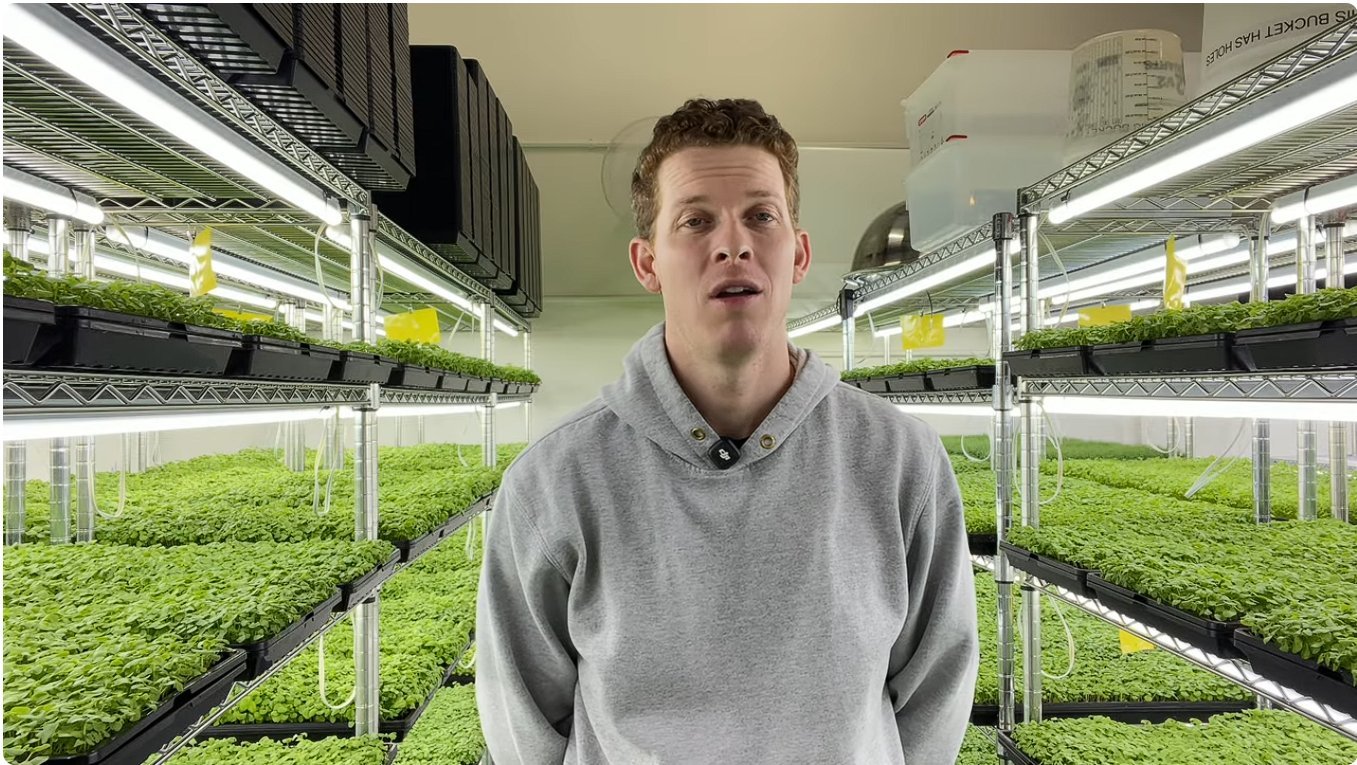
Garrett Corwin grows microgreens for a living. His farm, Piedmont Microgreens, operates out of Durham, North Carolina, and at peak produces around 400 trays per week. It is a real commercial operation: recurring restaurant accounts, varying order sizes, tight harvest windows, and a team that needs to know what to do on any given day.
A few years ago, Garrett was managing all of it in spreadsheets. The system worked until it didn’t. Every variety has a different grow time. Every delivery has a different date. That means every tray has its own seed date, calculated backward from when it needs to be ready. Multiply that across a full week of orders and a handful of varieties, then add a last-minute customer change. One wrong date in the spreadsheet and you’re either seeding late or delivering short.
Microgreen Manager was Garrett’s idea. He knew the problem from the inside and saw what a purpose-built tool could do for an operation like his. Spencer, his brother, a Meta engineer, had the technical skills to build it. They worked together to bring it to life and build the business. Garrett’s farm became the test environment. Every feature went through the reality check of a working commercial farm. Nothing was shipped to other growers until Garrett had tested it.
Piedmont Microgreens is now GAP certified. The farm runs entirely on Microgreen Manager. To be clear about what that means: the GAP certification belongs to the farm, not the software. Microgreen Manager does not currently have GAP-specific recordkeeping features built in. That is on the roadmap, but it is not there yet. What the software does provide (batch records, tray labels, QR codes, and order history) supports the kind of disciplined documentation that a GAP-compliant operation requires. Garrett runs a high-standards commercial farm on this platform every day. That is the proof point. No feature list matches it.
Microgreen Manager is the microgreens software built for commercial growers with real customers, recurring orders, and something at stake when the harvest doesn’t match the plan.
What does Microgreen Manager actually do?

Most microgreens software on the market is really just a spreadsheet dressed up with a login screen. Microgreen Manager is not that. It was built around the workflows a commercial farm actually runs, not the workflows someone imagined a farm might run.
Here is what is inside the platform.
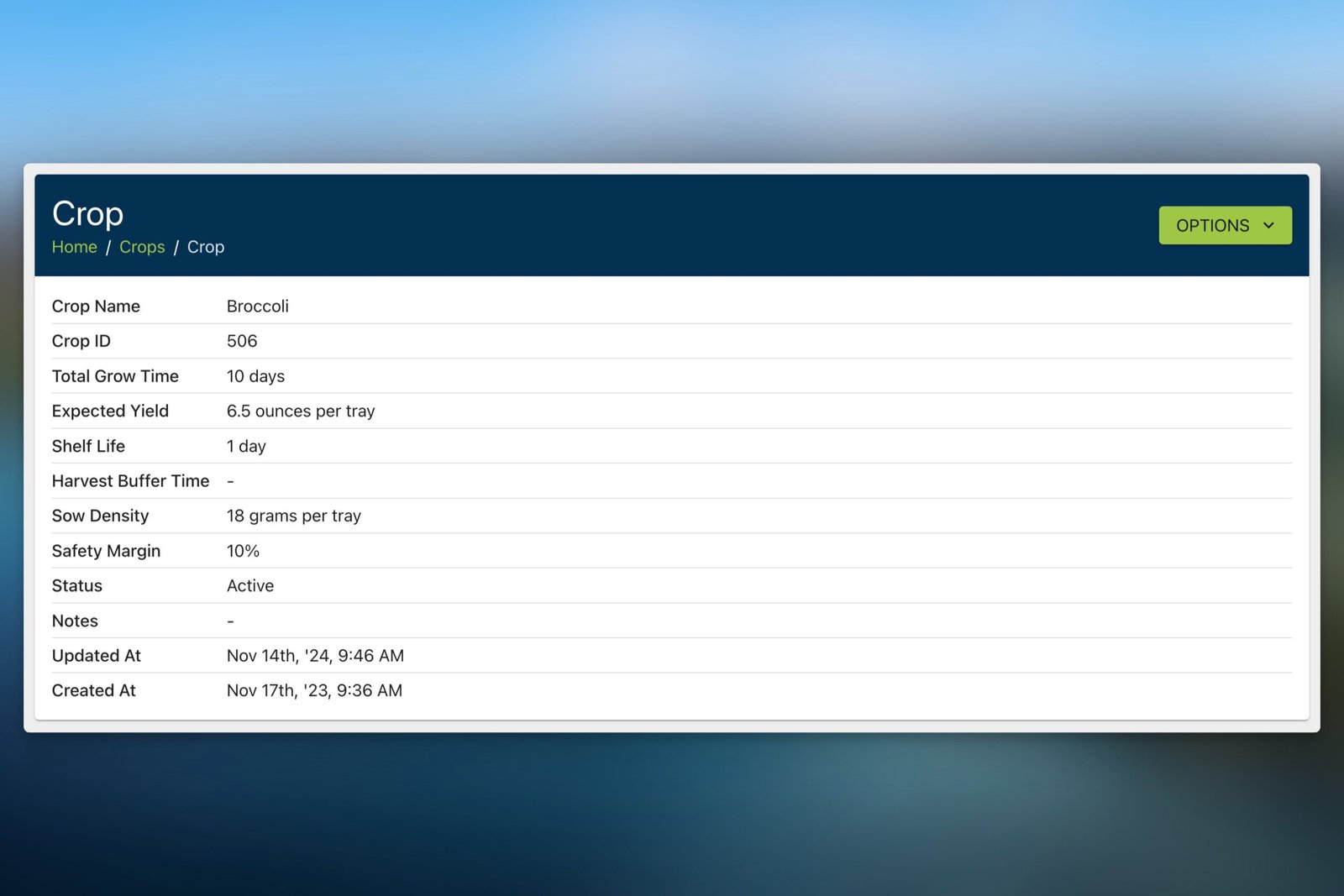
Crop and blend management. Every variety you grow lives in the system. You set germination time, days to harvest, seeding density, and expected yield per tray. Blends are post-harvest combinations. You grow each component crop separately, harvest them individually, then mix and pack. When a component crop changes, everything tied to that blend updates automatically. No manual recalculation. Co-planted mixes like a radish trio get logged as a single crop rather than a blend, which is how the software handles varieties seeded and harvested together. A co-planting feature is on the roadmap.
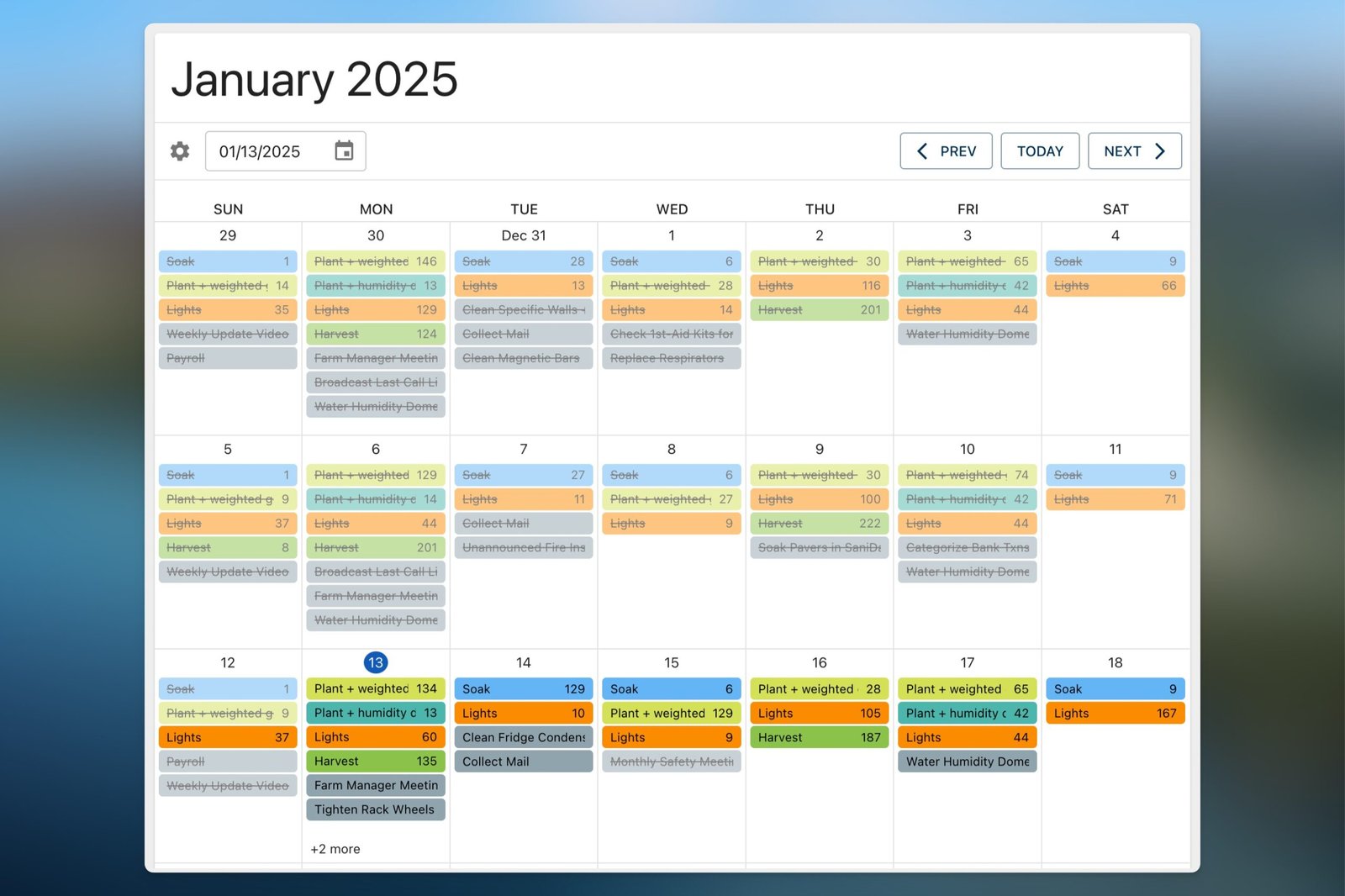
Order and fulfillment automation. Customers and accounts are stored in the system. When an order comes in, Microgreen Manager works backward from the delivery date and schedules the seed date automatically. That scheduling logic is the core of the software’s value. It removes the mental math that causes growers to double-book trays or miss a harvest window.
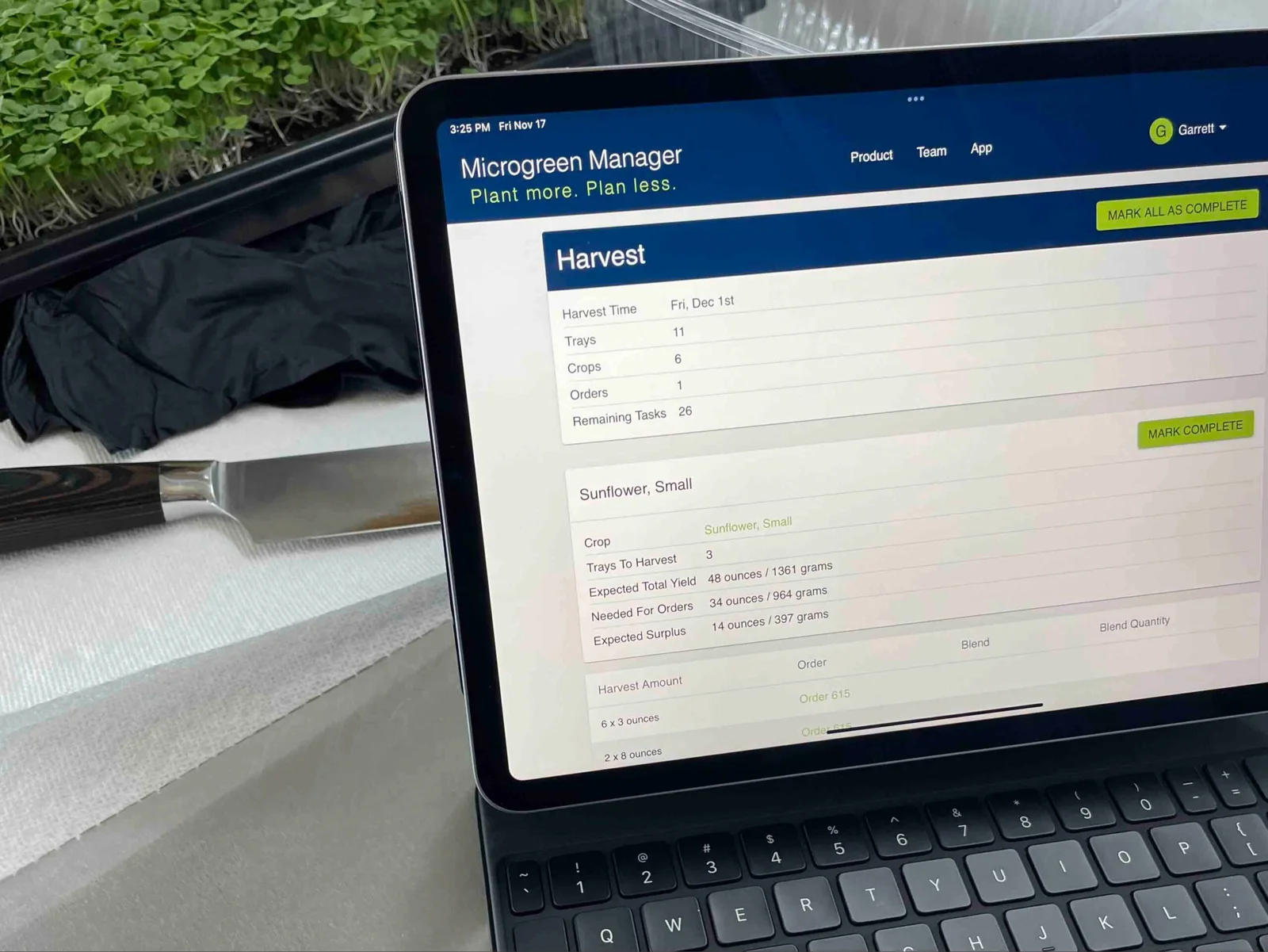
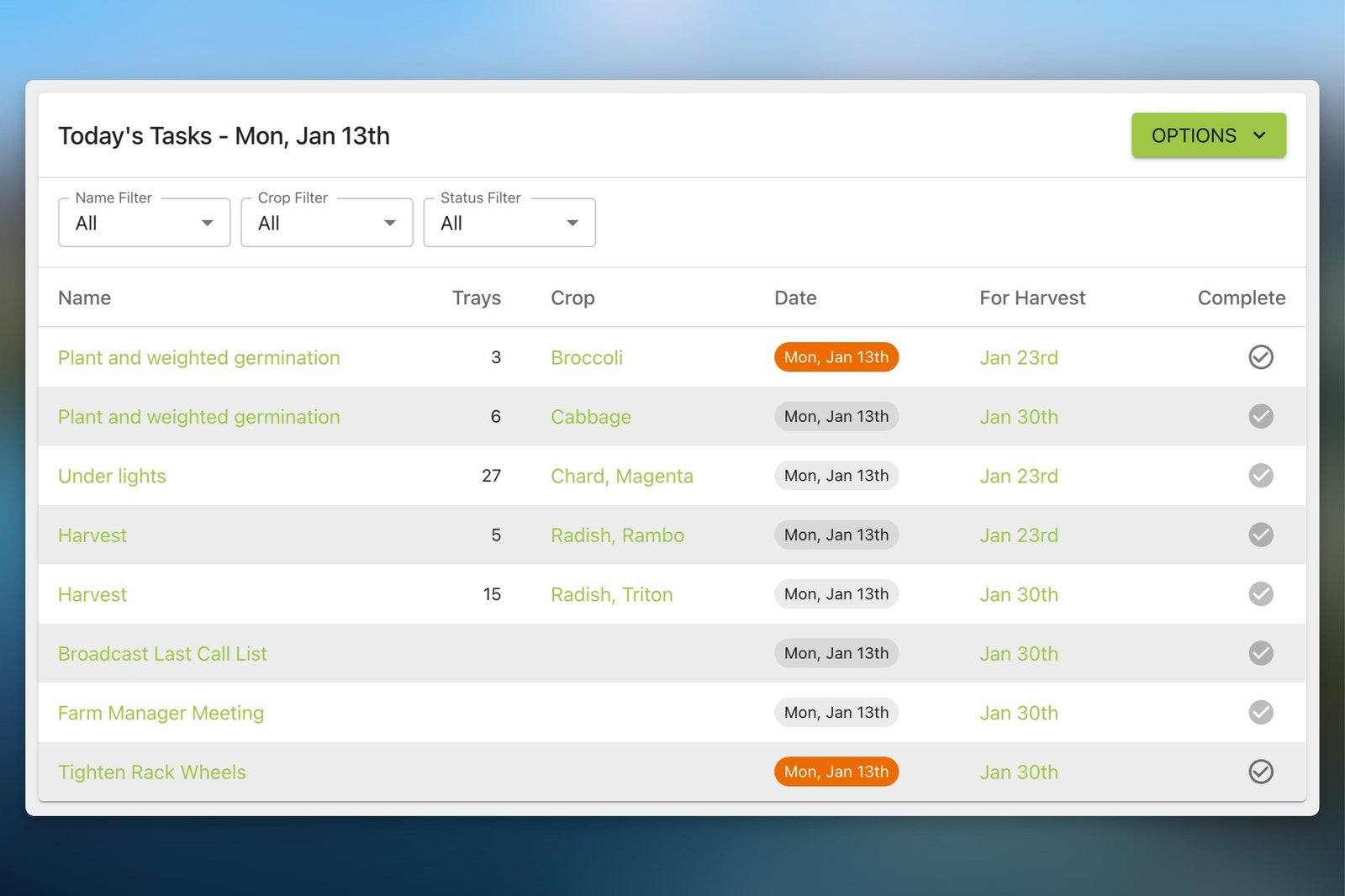
Daily task dashboard. Every morning, the platform surfaces what needs to happen: what to seed, what to water, what to harvest, what to deliver. The dashboard is designed to be handed to a team member without explanation. That matters on a real farm, where not every person running trays is the owner.
Tray labels and QR codes. Each planted tray gets a printable label with a QR code that links back to the batch record. This is meaningful traceability, the kind of documentation a GAP food recall program is built around. One piece is still missing: lot numbers. A GAP auditor specifically looks for lot number tracking in the traceability section of a food recall audit, and that feature is not in the software yet. What exists today still puts you well ahead of a spreadsheet. The lot number piece is the gap between good documentation habits and full audit-ready traceability.
Basic CRM and farm reports. Customer contact records and order history give you a running picture of your accounts. Current reporting shows how many trays of each crop you have grown over a given time period. Revenue by crop, yield-per-tray benchmarks, and expense tracking are not in the software yet, though all three are on the roadmap. What exists today still puts you well ahead of a spreadsheet for understanding your operation’s activity at a glance.
Team accounts. Multiple users can log in with adjustable permissions. The owner can control what each team member can edit, from confirming tasks are complete to changing crop parameters. What permissions do not control is visibility. Everyone on the account sees everything, which, on a production floor, is actually a feature. When a harvest tech can see the full schedule without asking, the operation runs faster. On a 400-tray farm like Piedmont, shared visibility matters as much as the edit controls.
The platform runs in a browser on a desktop or tablet. at the time of this review. This may or may not be a real limitation for growers who want to log harvest weights from the floor without carrying a tablet. More on that in the gaps section.
How hard is it to get started?
Honest answer: It depends on how well you know your own operation.
Microgreen Manager is not a plug-and-play app. The setup process asks you to define your crops, your yields, your customers, your pricing, and your delivery schedules before the software can do much for you. If you have been winging those numbers, which most small growers have, that initial data entry forces a reckoning.
That is not a criticism. It is actually useful. Building your crop library makes you think through seeding density and expected yield per tray in a way that a spreadsheet never demands. But plan for two to four hours of focused setup before the dashboard makes sense.
Once your crops and accounts are in the system, the daily workflow clicks fast. Most growers report the learning curve flattens within the first two weeks.
Microgreen Manager offers email support, live chat, and a searchable knowledge base, all accessible from a widget inside the app. Live chat responses typically come within minutes to a few hours. For growers who learn by doing, the interface is logical enough to navigate without hand-holding. For growers who want a guided walkthrough, the YouTube library covers the core features.
If you know your numbers, you will be running in a day.
What does Microgreen Manager cost, and is it worth it?
Microgreen Manager offers a free Hobby plan that covers the basics for home growers and very small operations. Paid plans scale up from there, designed for commercial farms that need order management, team accounts, and tray-level reporting. Current pricing is listed on their site. Check it directly, because software pricing moves.
The worth-it question is more interesting than the number.
For a commercial operation running 50-100 trays and up a month, with multiple wholesale accounts and a harvest schedule that changes weekly, the paid plan pays for itself the first time it prevents a missed order. One dropped delivery to a restaurant account can cost more than a year of software subscription. That math is not complicated.
The deeper value is not the scheduling. It is the structure. Most growers running spreadsheets are working from memory and rough estimates. Microgreen Manager forces you to define your crops, your delivery commitments, and your customer accounts in one place. After 90 days in the system, you have a clearer picture of which accounts drive the most revenue and where your operation actually stands. That clarity, built from consistent data entry rather than guesswork, is what the microgreens software is actually selling.
The commercial microgreens market is growing fast. More restaurant and cafe buyers, more meal kit demand, more competition. That growth is exactly what makes the gap between knowing your numbers and guessing at them so expensive.
If you are scaling beyond a side hustle, the ROI case is straightforward. If you are still figuring out your operation, start with the free plan and upgrade when the limits feel real.
Full traceability is kind of stretching the truth with our current functionality.
What’s missing from Microgreen Manager right now?
No honest review skips this section. Here is what the platform does not do well yet.
No lot number tracking. The tray labels and QR codes create meaningful traceability, but lot numbers are not in the system yet. A GAP auditor specifically looks for lot number tracking in the food recall section of an audit. Until that feature ships, the traceability workflow gets you close but not fully across the line.
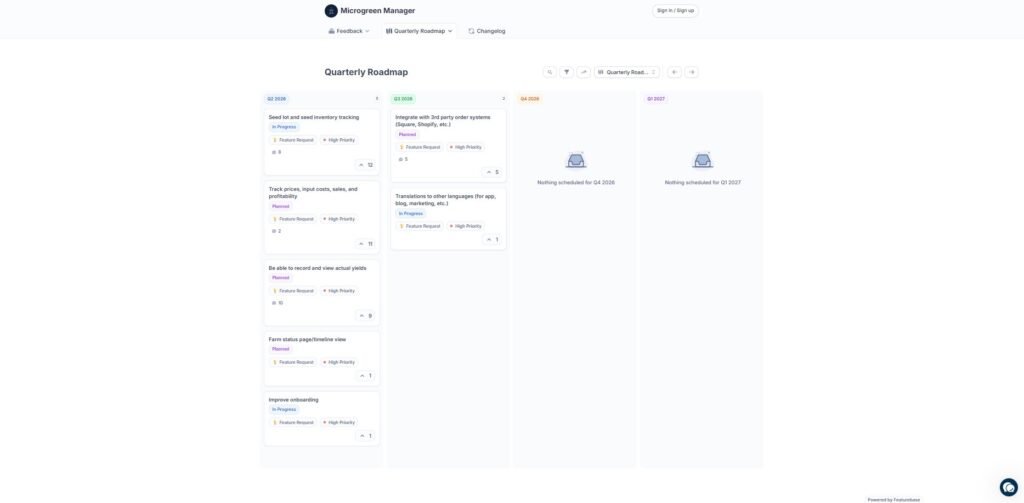
No harvest weight logging. You cannot record the actual yield per tray inside the software yet. That means the yield benchmarks you set at setup are estimates, not verified actuals. Harvest weight logging is on the Q2 2026 roadmap.
No expense accounting. There is no way to enter seed costs, substrate, labor, or packaging to calculate a true profit margin by crop. What you can see is which crops drive the most revenue and which customers order the most volume. Useful, but not the full picture.
No direct accounting integration. The revenue data that does exist does not connect to QuickBooks, Xero, or similar platforms. You are exporting and reconciling manually until that integration ships.
No multi-location management. Growers running more than one facility cannot view a unified dashboard across sites. Each location operates as its own separate account.
These are genuine gaps, not deal-breakers for most single-location operations. The core scheduling and documentation functions work well. But if expense accounting or multi-location management is non-negotiable for your farm, know that going in.
The team is active in development. Their public roadmap shows seed inventory tracking, lot number tracking, harvest weight logging, and expense accounting all planned for Q2 2026, with Square and Shopify integrations in Q3.
How does Microgreen Manager compare to the competition or a spreadsheet?
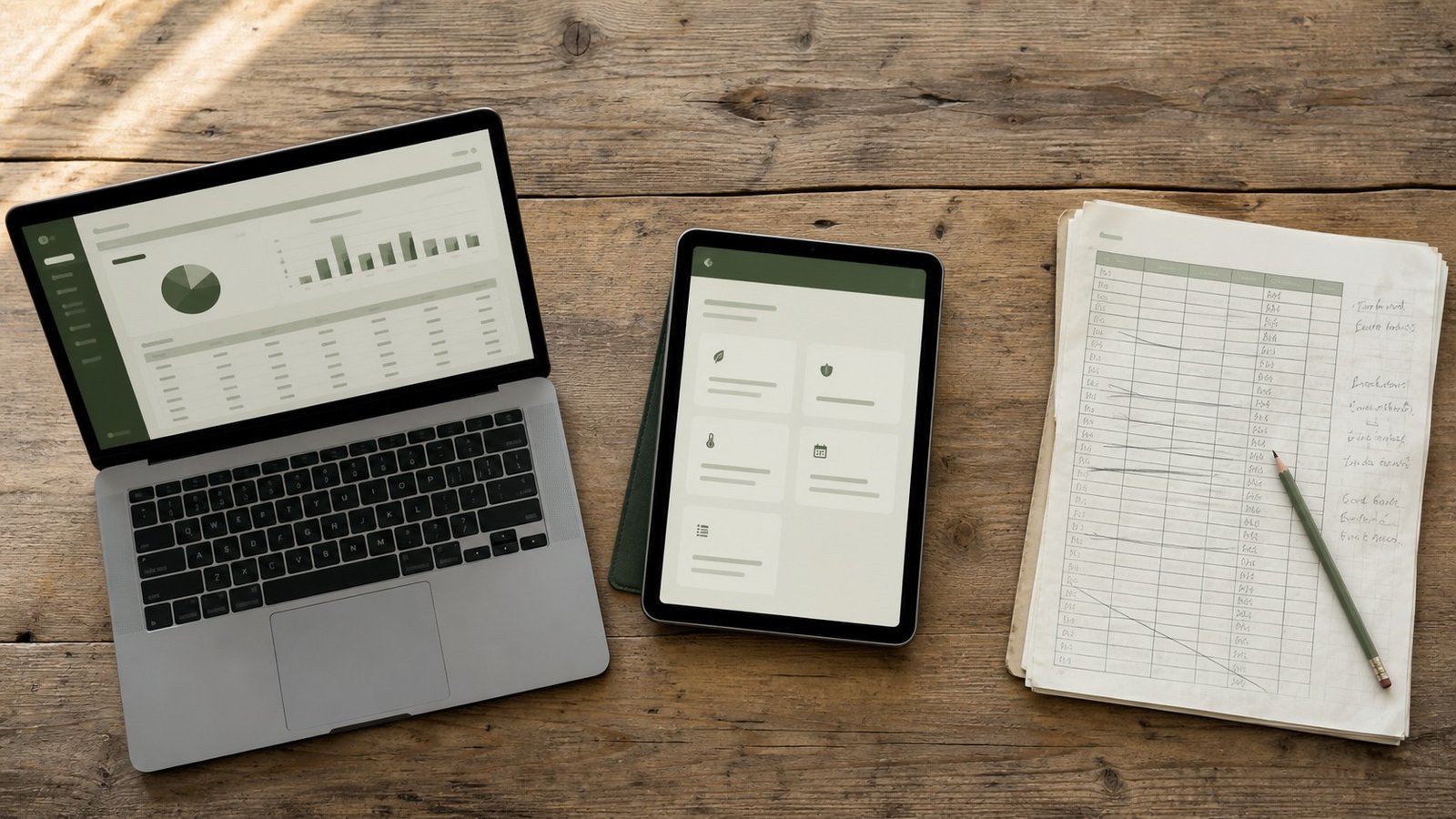
Microgreen Manager names its competitors directly on its website, which is a confident move. The three worth comparing are SeedLeaf, Tend, and the spreadsheet most growers are already running.
SeedLeaf is purpose-built for microgreens, not general market gardening. It’s a real competitor. It handles crop planning, customer orders, and financial planning, and it already includes seed lot tracking, something Microgreen Manager hasn’t built yet. If lot-level traceability is a hard requirement today, look at SeedLeaf before deciding. Where Microgreen Manager pulls ahead is blend management (SeedLeaf doesn’t handle multi-variety mixes natively), team accounts with role-based editing, and no caps on plantings or orders on the Pro plan. Both tools serve the same niche. The difference is which workflow gaps matter most to your operation.
Tend is built for diversified market farms growing vegetables, flowers, herbs, and microgreens together. It includes AI planning tools, accounting, field mapping, and time-and-attendance tracking. For a farm managing multiple production systems, that scope makes sense. For a microgreens-only operation, it adds complexity you don’t need. The scheduling and task management in Tend are built around row crops and beds, not trays and germination rooms.
Spreadsheets break down in predictable places: backward scheduling from a delivery date requires a manual calculation every time, there’s no automatic task list for the team, and tracing a problem tray back to its seed date is a dig through rows. The growers who get the most out of Microgreen Manager are usually the ones who already hit that wall.
Microgreen Manager wins on specialization. It is not the most powerful farm software available. It is the most purpose-built microgreens software available, and for a single-crop commercial operation, that focus is the feature.
Who should use Microgreen Manager, and who should wait?
Use it if:
per month, multiple wholesale accounts, and a harvest schedule that changes week to week. You are tired of holding your crop calendar in your head. You have had at least one close call with a missed order or a double-booked tray. You are working toward GAP certification, or you already hold it and need documentation that actually survives an audit. You have team members who need to know what to do without calling you first.
Wait if:
You are still experimenting with which crops and customers work for your market. You are running fewer than 30-40 trays with one or two accounts. Mobile-first workflow is a hard requirement for how your team operates. You need accounting software integration before you can justify adding another platform.
The free Hobby plan removes most of the “wait” objections for curious growers. You can build your crop library and explore the interface with no financial commitment. The ceiling on the free plan will tell you whether the paid tier makes sense for where your farm is headed.
This microgreens software rewards growers who already understand their operation. The clearer your numbers, the faster it pays off.
Pros and Cons Snapshot
Pros: Purpose-built for microgreens, not adapted from generic farm software. Backward scheduling from the delivery date prevents missed orders. Traceability tools (tray labels, QR codes, batch records) are built into the default workflow. The daily task dashboard runs the team without the owner in the room. Free plan available with no credit card required. Public roadmap with active development and community voting.
Cons: No expense accounting yet. No lot number tracking yet. No direct accounting software integration. Multi-location farms require separate accounts. Setup requires knowing your numbers before the software can help you.
Pros
- ✓ Purpose-built for microgreens, not adapted from generic farm software
- ✓ Backward scheduling from delivery date prevents missed orders
- ✓ Traceability tools (tray labels, QR codes, batch records) built into the default workflow
- ✓ Daily task dashboard runs the team without the owner in the room
- ✓ Free plan available, no credit card required
- ✓ Public roadmap with active development and community voting
Cons
- ✗ No expense accounting yet
- ✗ No lot number tracking yet
- ✗ No direct accounting software integration
- ✗ Multi-location farms require separate accounts
- ✗ Setup requires knowing your numbers before the software can help you
The Bottom Line: Microgreen Manager Review
Microgreen Manager is not perfect microgreens software. While mobile-responsive, the missing mobile app is a real gap. The onboarding asks more of you than most tools do. If your operation is still finding its footing, it may be more structure than you need right now.
But for a commercial grower running a real schedule with real wholesale accounts, it is the most purpose-built tool available. The scheduling logic alone is worth the subscription. The documentation habits it builds (batch records, order history, tray-level tracking) put you closer to audit-ready than a spreadsheet ever will. And the data it accumulates over time gives you something a spreadsheet never will: actual proof of what your farm produces and what it costs.
Garrett built it because he needed it. That origin story shows in every feature that matters.
Try the free plan. Your harvest schedule will tell you the rest.
Frequently Asked Questions
Does Microgreen Manager work for growers outside the United States?
Yes. The platform is browser-based and accessible internationally. Pricing is displayed in USD, so growers in other countries should account for currency conversion. The Q3 2026 roadmap includes translations for the app and marketing materials, suggesting the team is actively building for an international audience.
Can I export my data if I decide to cancel?
Microgreen Manager allows you to export your farm data. This matters more than most growers realize at signup. Your crop library, customer records, and order history represent real operational knowledge. Confirm the current export options directly with their support team before committing, particularly if data portability is a priority for your business.
Do I need farming or software experience to use it?
Neither, specifically. What you do need is a clear picture of your own operation — your crops, your yields, your customers, your pricing. Growers who struggle with setup are usually growers who have not yet pinned down those numbers. The software does not figure out your farm for you. It organizes what you already know.
Does it help with food safety documentation beyond GAP certification?
The traceability features, batch records, tray labels, QR codes, and seed lot tracking are designed around the documentation requirements common to GAP audits and similar food safety programs. Whether that satisfies a specific buyer’s food safety requirements depends on the buyer. If you sell to a distributor or large retailer with their own audit standards, verify compatibility before switching your documentation workflow.
Can Microgreen Manager handle unusual or custom crop varieties?
Yes. You build your own crop library inside the platform, which means any variety you can grow, you can track. There are no locked-in crop lists. If you are trialing a new species or running a proprietary blend, you add it the same way you would sunflower or pea shoots.
Is there a user community or grower network connected to the platform?
Not a formal community at the time of this review. Support runs through live chat, email, and a YouTube channel covering core features, all accessible from a widget inside the app. There is also a public Feedback Board where users can post feature requests, bug reports, and general feedback directly to the team. A dedicated grower community has not appeared on the public roadmap yet.
References
Michell, K. A., Isweiri, H., Newman, S. E., Bunning, M., Bellows, L. L., Dinges, M. M., Grabos, L. E., Rao, S., Foster, M. T., Heuberger, A. L., Prenni, J. E., Thompson, H. J., Uchanski, M. E., Weir, T. L., & Johnson, S. A. (2020). Microgreens: Consumer sensory perception and acceptance of an emerging functional food crop. Journal of Food Science, 85(4), 926–935. https://doi.org/10.1111/1750-3841.15075
Polaris Market Research. (2024). Microgreens market size, share, growth and forecast to 2033. https://www.polarismarketresearch.com/industry-analysis/microgreens-market
Treadwell, D., Hochmuth, R., Landrum, L., & Laughlin, W. (2020). Microgreens: A new specialty crop. EDIS, 2020(3). https://doi.org/10.32473/edis-hs1164-2020
U.S. Department of Agriculture, Agricultural Marketing Service. (n.d.). Good Agricultural Practices (GAP) & Good Handling Practices (GHP) audit verification program. https://www.ams.usda.gov/services/auditing/gap-ghp
Weber, C. F. (2017). Broccoli microgreens: A mineral-rich crop that can diversify food systems. Frontiers in Nutrition, 4, 7. https://doi.org/10.3389/fnut.2017.00007